
LED strip lights have become a popular lighting solution for kitchens, bedrooms, living rooms, commercial spaces, and outdoor projects. They offer flexible installation, can be cut to size, and are capable of producing a wide variety of lighting effects. However, even high-quality LED strips may eventually experience a drop in brightness, localized failures, or even complete malfunction. When such issues arise, is it necessary to replace the entire LED strip lights, or can you simply repair the damaged section? Furthermore, how can you replace an LED strip without causing damage to surrounding surfaces, wiring, or the power supply?
Can We Replace the LED Strip Lights?
Certainly, most LED light strips can be replaced. However, the specific replacement process depends on how the strips are installed, as well as the power supply, controller, and connection type used.
Before purchasing a new LED light strip, first identify which part of the lighting system has failed. If the lights aren’t working, the issue could stem from a faulty power supply, a loose connection, a malfunctioning controller, or a problem with the LED components themselves.
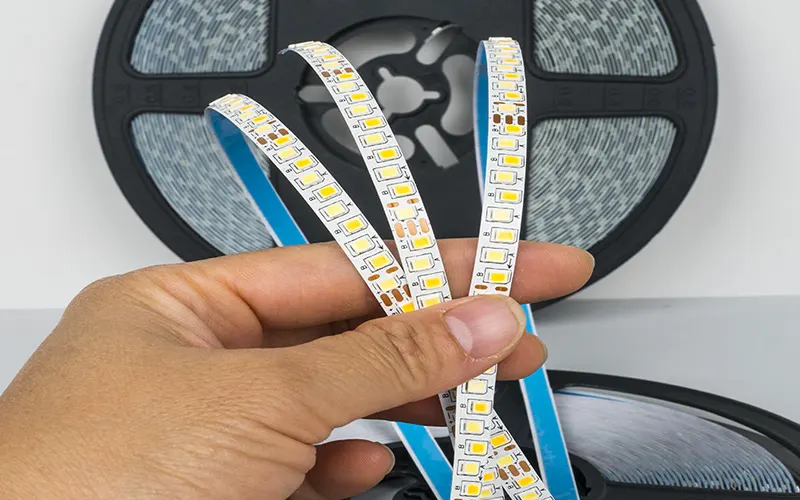
LED strips in aluminum profiles
Replacing LED strips installed within aluminum profiles is relatively straightforward. You simply need to remove the diffuser (cover), which is generally easy to take off. In contrast, if the LED strips are adhered directly to a cabinet or wall, extra care is required; the adhesive backing may leave residue or damage the surface finish (paint).
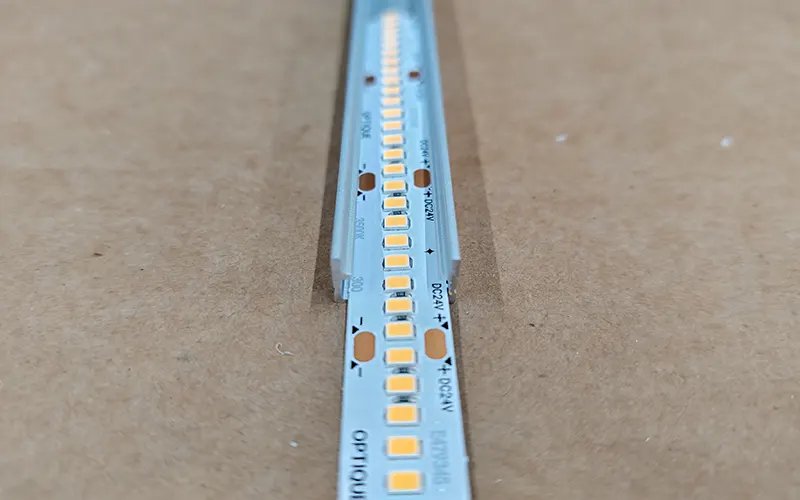
Replacing Only a Section of the LED Strip
If the LED strip is designed to be cut and reconnected at designated points, you can replace just the damaged section. However, if the existing LED chips have aged or lost brightness, replacing the entire strip may provide a more uniform visual appearance.
In most cases, there is no need to replace the entire lighting system—simply swapping out the LED strip is sufficient. The key is to select a strip with compatible specifications and ensure that your existing power supply, controller, and wiring can support the new strip.
How Do You Determine If an LED Strip Needs To Be Replaced?
LED strip failures do not always happen suddenly; when a malfunction occurs, you need to pause and troubleshoot. Sometimes, performance may decline gradually, while at other times, the strip might stop working entirely without any warning.
Recognizing these signs of failure will help you decide whether the light strip needs to be replaced or if it can simply be repaired.
1. LED Strip Lights Not Working
If your LED strip lights stop working entirely, you might assume the individual LEDs have burned out. However, the issue may not necessarily lie with the strip itself. Several factors can cause LED strips to fail to light up:
- Power Supply Failure: The power adapter may no longer be providing the correct output voltage.
- Loose Connections: Disconnected wires, damaged connectors, or poor solder joints can break the electrical circuit.
- Controller Issues: For LED strips that use RGB, RGBW, SPI, or DMX control, a faulty controller or an incorrect configuration can cause the strips to stop responding.
- Physical Damage to the Strip: Broken copper traces, water ingress, overheating, or electrical damage can all cause the strip to fail.
- Wiring Errors: Reversed polarity or incompatible power connections can also prevent the LEDs from functioning correctly.
Before replace the LED strip lights, check that the power supply is working properly and ensure all connections are secure. Always disconnect the power source before inspecting or working on any wiring.
If both the power supply and the controller are functioning correctly, yet the strip remains unresponsive, it may need to be replaced.
If only a specific section of the strip fails to light up, inspect that area and its connections. In the case of addressable (smart) LED strips, damage to a single pixel or a break in the signal path can sometimes affect subsequent sections of the strip, depending on its specific design and architecture.
2. Gradual Dimming of LED Light Strips
This is the most common issue: a gradual reduction in brightness. While your LED light strip may still function, it no longer shines as brightly as it did when first installed.
Assuming the product is not defective, this is a natural process known as “lumen depreciation” (or light decay) that occurs over time, indicating that the strip needs to be replaced.
There are several reasons why LED brightness may decline:
- LED Aging: As operating time accumulates, the brightness of an LED will gradually decline.
- Overheating: Poor heat dissipation accelerates brightness degradation and shortens the product’s lifespan.
- Power Supply Degradation: A faulty power supply may fail to provide stable voltage under load.
- Surface or Diffuser Soiling: The accumulation of dust or oil, or discoloration of the diffuser cover, can obstruct light output and diminish the overall lighting effect.
Is It Easy to Replace LED Strip Lights?
Yes, replace LED strip lights is a task you can easily handle yourself (DIY), especially if the existing setup uses standard low-voltage strips and the connection points are easily accessible.
Naturally, the level of difficulty depends on where the strips are installed and how the lighting system is configured.
Situations where replacement is generally straightforward include:
- LED strips attached beneath kitchen cabinets.
- Bedroom or living-room strips installed along accessible edges.
- LED strips mounted inside aluminum profiles with removable covers.
- Low-voltage strips connected through accessible plug-in connectors.
More complicated replacements may involve:
- LED strips installed inside ceilings, walls, or built-in furniture.
- Waterproof strips sealed into outdoor structures.
- RGBIC or SPI strips that require compatible controllers and data connections.
- DMX512 installations connected to lighting consoles or centralized control systems.
- Mains-voltage LED strips, which require additional electrical precautions.
Before starting, identify whether your strip operates at 5V, 12V, 24V, or mains voltage. Low-voltage LED strips are generally easier to handle, but you must still disconnect the power before installation.
If the installation involves fixed mains wiring, concealed electrical connections, or uncertain wiring, consult a qualified electrician.
What Should You Consider When Replace LED Strip Lights?
Replace a LED strip lights involves more than just finding a product that looks similar. Before making a purchase, be sure to verify the following five key elements.
1. 1. Matching Voltage and Power Requirements
Voltage compatibility is critical. If your existing LED strip operates on 24V DC, you must select a replacement that also runs on 24V.
Additionally, you need to verify the power consumption per meter and the total length of the installation.
For example, if an LED strip is 5 meters long with a rated power consumption of 10W per meter, the total power requirement is 50W:
5 meters × 10W/meter = 50W
The power supply must be capable of providing the correct voltage and sufficient power. While also incorporating an appropriate safety margin as recommended by the manufacturer.
Never connect a high-voltage LED strip to a low-voltage power supply. Furthermore, do not assume that two LED strips are interchangeable simply because they share the same type of connector.
2. Check the LED Type, Color, and Brightness
Choose a replacement that provides the lighting effect you want.
- Single-color LED strips: Produce one fixed color, such as warm white, neutral white, or cool white.
- RGB LED strips: Mix red, green, and blue to create a range of colors.
- RGBW LED strips: Add a dedicated white channel for improved white-light options.
- RGBIC or SPI LED strips: Allow individual pixels or groups of LEDs to display different colors and effects, depending on the strip and controller.
For white LED strips, compare the color temperature in Kelvin (K), brightness in lumens per meter. And colour rendering index (CRI) if color accuracy matters.
For RGB, RGBW, or addressable strips, verify the LED type, signal protocol, channel configuration, and controller compatibility. A strip with the wrong control method may not work correctly even if the voltage matches.
3. Measure the Length, Width, and Installation Space
Before ordering replacement LED strips, verify the total length, width, and cut points of the strips, as well as the available space within the aluminum profiles or mounting channels. Also, check the dimensions of any connectors and the location of the power input points.
If you plan to install higher-wattage LED strips, ensure that the mounting profile is wide enough to accommodate them and provides adequate heat dissipation.
For long-run installations, consult the specifications regarding the recommended maximum continuous length and power input requirements.
You may need to connect power at multiple locations to minimize voltage drop and ensure consistent brightness.
4. Choose the Correct Waterproof Rating
The installation environment determines how much protection your replacement strip needs.How to Choose the Waterproof LED Light Strips?
- IP20: Suitable for dry indoor environments without direct exposure to water.
- IP65: Often suitable for applications requiring protection against dust and water jets, subject to the specific product design.
- IP67: Designed for temporary immersion under defined test conditions, depending on the product and installation.
- IP68: Designed for immersion under conditions specified by the manufacturer.
These ratings are not interchangeable guarantees of suitability for every outdoor or underwater installation. The actual protection depends on the complete product, connectors, end caps, cable entries, and installation method.
For bathrooms, gardens, building facades, or other demanding environments, select a strip specifically designed for the intended conditions. Swimming pools and permanent underwater installations require products approved for that application, along with appropriate electrical protection and installation practices.
5. Check the Adhesive, Heat Dissipation, and Control System
The replacement LED strip must be able to adhere securely to the mounting surface. Always clean and dry the mounting surface before applying the adhesive backing of the LED strip.
In appropriate installation scenarios, using aluminum profiles can improve heat dissipation and protect the LED strips, while also resulting in a neater, more aesthetically pleasing installation.
If the setup involves smart lighting or addressable LED strips, verify that the existing controller is compatible with the replacement strips. Check the required communication protocol, voltage, data wiring method, and control software.
For example, standard analog RGB LED strips and SPI-based addressable RGB LED strips typically require different control methods. If a DMX512 system is used, you will also need compatible DMX equipment and the corresponding wiring.
How to Replace LED Strip Lights Correctly?
If you are about to replace an old LED light strip, please follow the steps below to remove the old strip and install the new one.
1: Disconnect the power
Begin by turning off the main power supply; switch off the LED system and disconnect it from the power source. Never attempt to perform replacements while the light strip is powered on.
2: Remove the old LED strip
Carefully detach the existing LED strip from the mounting surface. If the adhesive is difficult to remove, use an appropriate adhesive removal method, ensuring that the mounting surface is not damaged.
If the LED strip is installed inside an aluminum profile, first remove the diffuser cover, then gently peel the LED strip away from the profile or mounting surface.
For waterproof LED strips, observe the configuration of the end caps, connectors, and sealed joints before proceeding with removal.
3: Clean the mounting surface
Remove any existing adhesive, dust, grease, or other residues from the mounting area.
Ensure the surface is completely dry before installing the replacement part. A clean surface allows the new adhesive to bond effectively, reducing the risk of the light strip peeling or detaching later on.
If installing the light strip inside an aluminum profile, ensure the profile is clean and undamaged, and verify that its dimensions are suitable for the width of the light strip and its heat dissipation requirements.
4: Measuring and Cutting the Replacement LED Strip
Before cutting, be sure to carefully measure the required length. Only cut the strip at the designated cut marks. Cutting elsewhere may damage the circuitry or prevent the remaining sections from functioning correctly.
If you need to connect multiple LED strip segments, use compatible connectors or appropriate soldering methods at the designated connection points. Ensure correct polarity during connection, and refer to the labels for positive voltage, ground, data, or color channels.
5: Connect the Power Supply and Controller
Connect the replacement LED strip to the appropriate power supply and controller.
- Single-color LED strips, ensure the positive and negative terminals are connected correctly.
- RGB or RGBW LED strips, verify that each channel terminal is matched accurately.
- SPI-addressable LED strips, check the power, ground, data transmission direction, and the required signal protocol.
- DMX512 LED strips require compatible DMX connection methods and control equipment.
For longer installation runs, confirm that the wiring and power supply configuration meet the manufacturer’s specifications. Take care to avoid overloading the controller, and ensure that the current does not exceed the rated capacity of the cables and connectors.
6: Test the LED Strips Before Installation
Once you have confirmed that all connections are secure and the wiring is correct, you may reconnect the power. Power on the system and verify that the replacement LED strips are functioning as expected.
For white-light LED strips, check the brightness and color temperature. The RGB or RGBW strips, test each color channel as well as the white-light channel. For addressable (multi-color/dynamic) LED strips, test various colors, display modes, and the overall operation of the entire strip.
If you encounter issues such as flickering, abnormal color display, or sections that fail to light up (dark spots), disconnect the power immediately. Inspect the wiring, power supply, controller settings, and signal connections, and ensure everything is correct before proceeding further.
Conclusion
Before replace LED strip lights or removing old ones, first identify the root cause of the issue—whether it lies with the LED chips, the power supply, the controller, or the wiring. Then, ensure that your chosen product—including its voltage, power requirements, LED type, dimensions, waterproof rating, and control method—aligns with the specific needs of your application.
By properly preparing the mounting surface, establishing secure connections, and testing the system before final installation, you can ensure stable operation and extend the service life of your lighting system.
ESSENLEDSTRIP specializes in addressable LED pixel strips, LED pixel neon strip, and a wide range of related lighting solutions, suitable for diverse application scenarios.
FAQs
The approach depends on the type of surface; extra caution is required if the surface is painted or covered with wallpaper. Before starting, turn off the power and disconnect the light strip from the power source.
You do not necessarily need to replace the power supply when changing an LED strip, provided that the new strip is compatible with your existing power supply. Ensure that the operating voltage of both matches (e.g., both are 12V or 24V DC).
Yes. In most cases, you only need to replace the damaged section rather than the entire LED strip. Please ensure that the replacement section matches the original strip in terms of voltage, LED type, color configuration, and control protocol.
Not necessarily. RGB and RGBIC LED strips use different control methods. When connected to a standard RGB controller, a typical RGB LED strip will display the same color across its entire length. In contrast, RGBIC LED strips feature built-in control chips (ICs) that allow different segments or individual pixels along the strip to display different colors simultaneously.
There is no fixed replacement schedule for LED light strips. However, you may need to replace them if you notice persistent dark spots, a significant drop in brightness, color inconsistencies, frequent malfunctions, or physical damage.